













Enjoy legendary and original series,
exclusive premieres and must-watch movies.


Elevate your viewing experience
UPGRADE
Premium
Stream on 4 devices at once
4K UHD & Dolby Atmos as available
100 downloads (limits apply)
additional
€4/month
Add during the order process or later by calling us at 130 or by visiting a Cablenet Store.
ADD
Sports
Stream Eurosport 1 and Eurosport 2
Enjoy live cycling, tennis & more
Limited to 2 of your available streams
additional
€3/month
Add during the order process or later by calling us at 130 or by visiting a Cablenet Store.
Already subscribed and ready to maximise your experience?
Follow the steps to activate
Start here
Step 1
Step 2
Step 3
Step 4
Step 5
Step 6
Start here
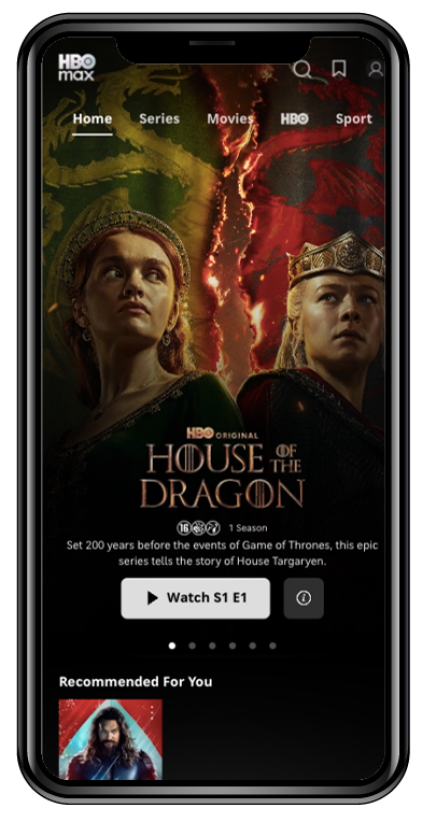
Get ready to join the HBO Max world
Follow a few simple steps to activate the HBO Max service.
Step 1
Step 1
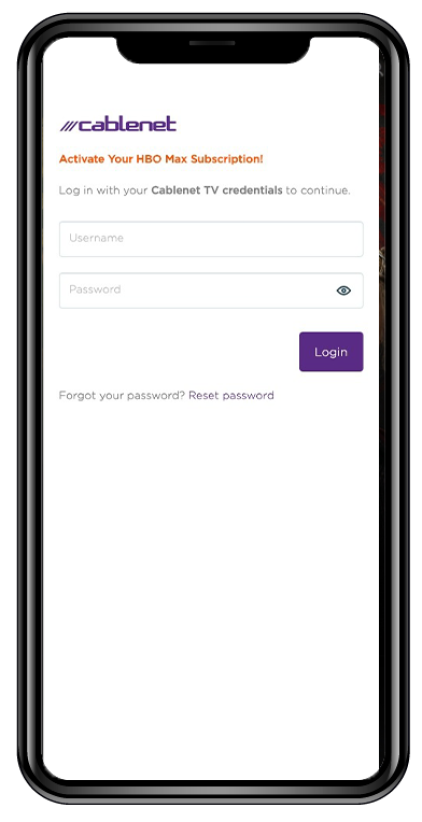
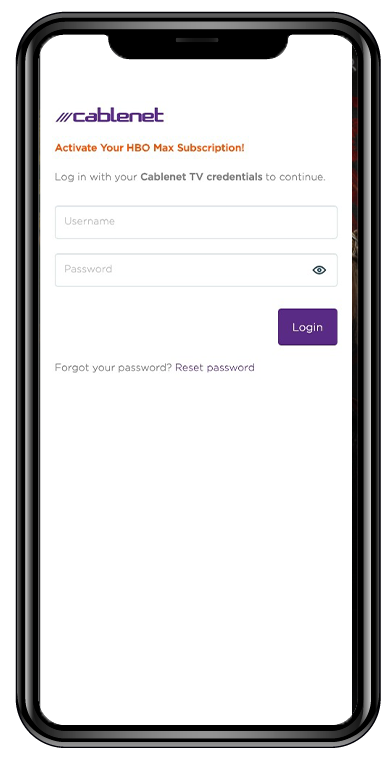
Click on the button below and log in with your Cablenet TV credentials (username and password).
*If you do not already have Cablenet TV credentials, you will receive them via SMS.
Step 2
Step 2
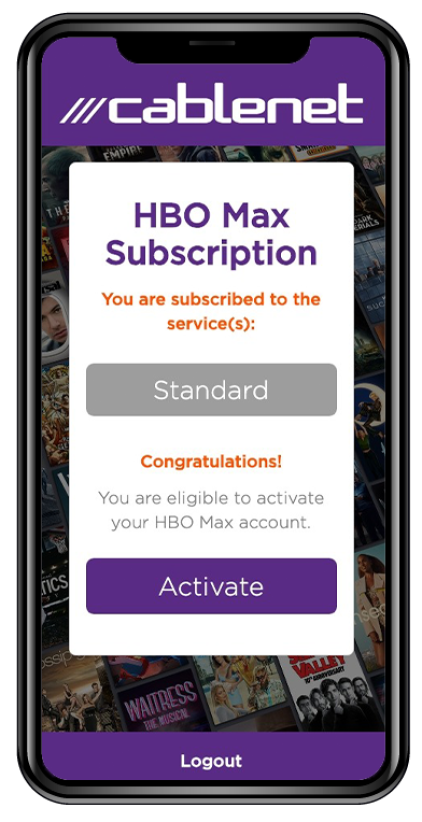
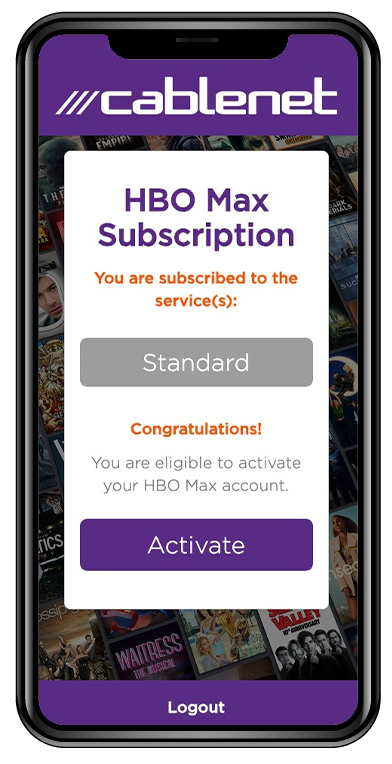
Your subscription will appear on the screen. Click ‘Activate’ to continue.
Step 3
Step 3
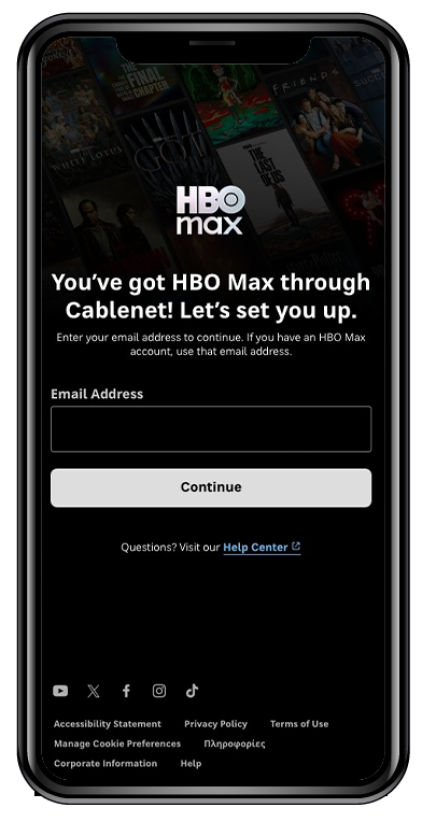
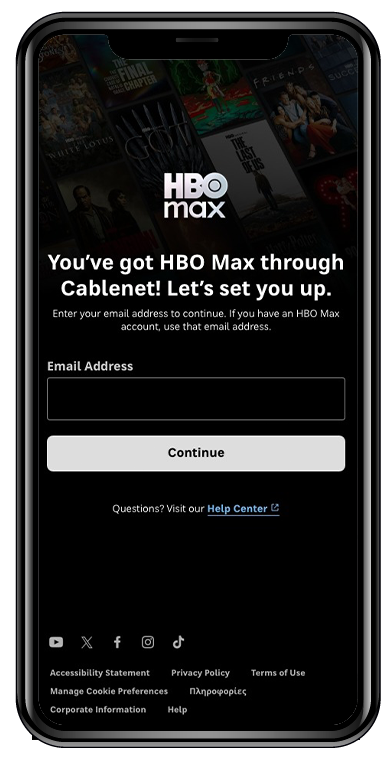
Create your HBO Max account. Enter your email address. If you have an HBO Max account, use that email address.
Step 4
Step 4
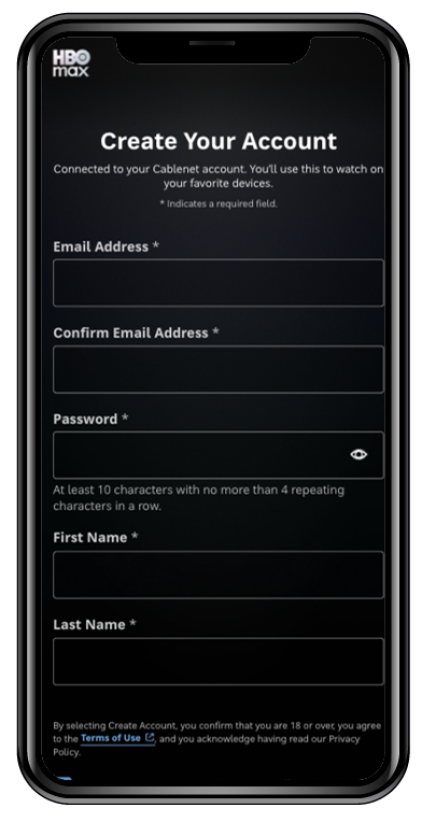
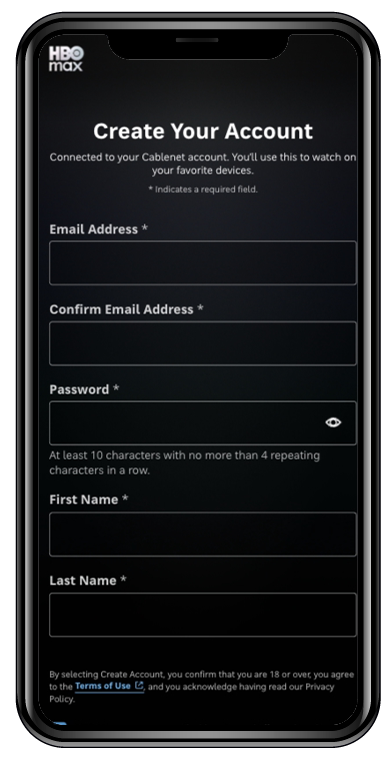
Complete your registration to HBO Max by filling out the “Create Your Account” page.
Step 5
Step 5
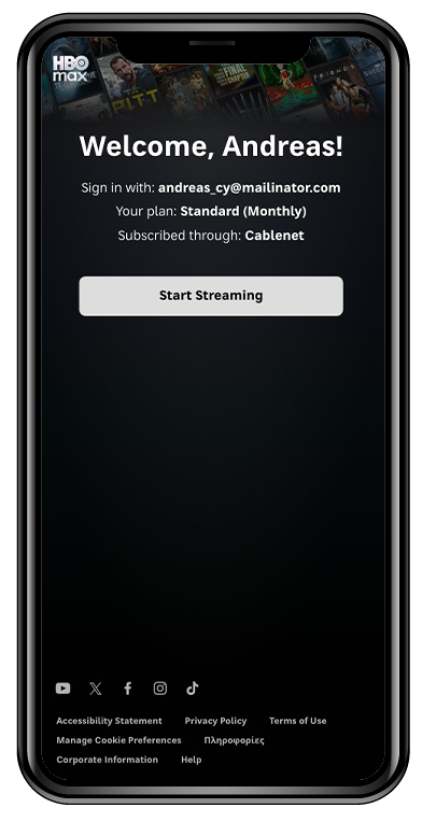
Press the “Start Streaming” button and download the HBO Max app on your device.
Step 6
Step 6
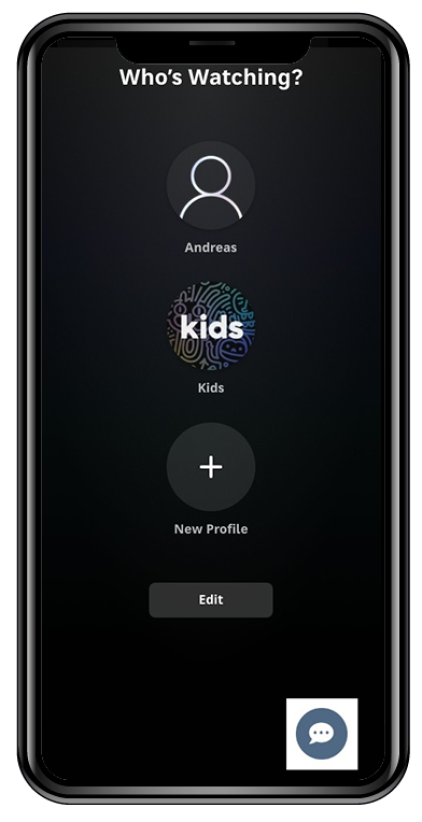
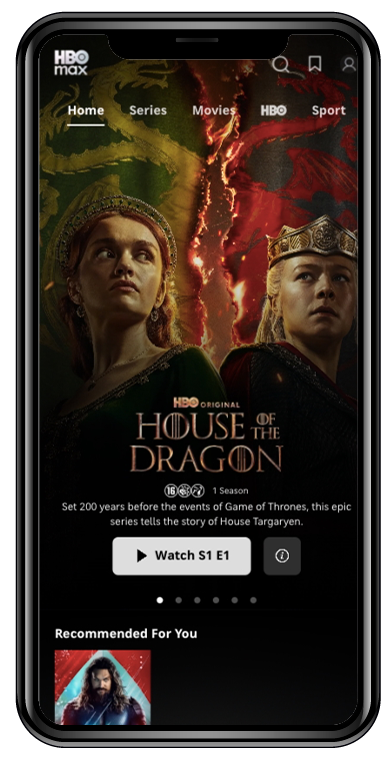
Open the app, sign in with your newly created HBO Max account to pair your device and start streaming!
Get ready to join the HBO Max world
Follow a few simple steps to activate the HBO Max service.
Step 1
Click on the button below and log in with your Cablenet TV credentials (username and password).
*If you do not already have Cablenet TV credentials, you will receive them via SMS.

Step 2
Your subscription will appear on the screen. Click ‘Activate’ to continue.
Step 3
Create your HBO Max account. Enter your email address. If you have an HBO Max account, use that email address.
Step 4
Complete your registration to HBO Max by filling out the “Create Your Account” page.
Step 5
Press the “Start Streaming” button and download the HBO Max app on your device.
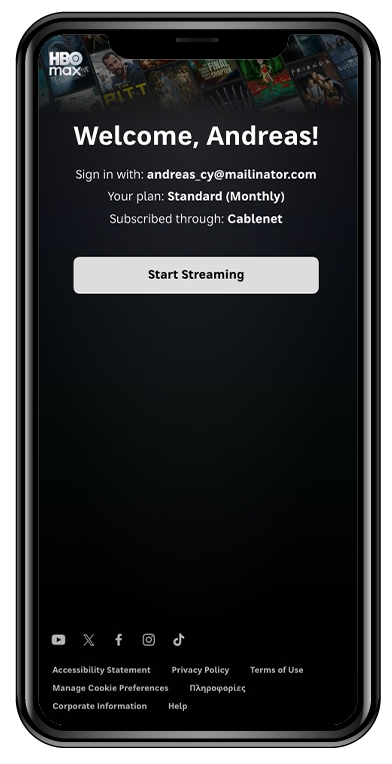
Step 6
Open the app, sign in with your newly created HBO Max account to pair your device and start streaming!
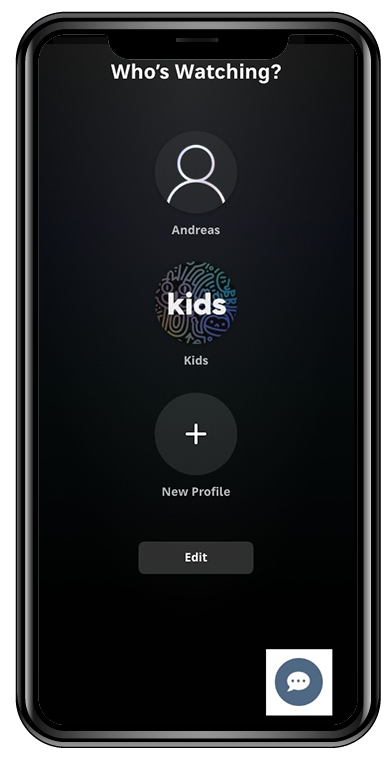
Good To Know
- Once your order process is completed, you will receive the credentials you will need for creating your HBO Max account.
- You can always upgrade to HBO Max Premium.
- You can also add HBO Max Sports any time.
- All plans are available with a 24month contract.
Disclaimer: HBO Max account creation required. HBO Max Terms of Use apply.. 18+. Channels, live content & sports (where available) contain ads. All plans may contain sponsorship and Cross-Promotional Content. Sport limited to two of your available streams.
Frequently Asked Questions
What is HBO Max?
HBO Max is a streaming service that offers series, movies, documentaries, and children's content. It includes both HBO productions and content from other subsidiaries of Warner Bros. Discovery.
What content does the HBO Max service include?
Through HBO Max, you gain access to a vast variety of content from top creators worldwide — from amazing series and blockbusters to documentaries, kids' shows, and reality TV.
- Discover series that defined television history, from Game of Thrones, Succession, and The Last of Us, to new productions like The Penguin and The Pitt.
- Classic and modern movies and shows that left their mark, from Friends and Two and a Half Men to the magic of Wonka.
- Step into the world of the most legendary superheroes and antiheroes like Batman, Superman, Wonder Woman, Aquaman, and the Joker.
- Breathtaking documentaries with visuals, stories, and experiences that inspire and move you.
- All the Harry Potter movies.
- Your childhood… brought to life again! With episodes of Bugs Bunny, Daffy Duck, Tweety, Sylvester, and of course, the classic duo Tom & Jerry.
What are Cablenet’s HBO Max Edition plans?
The HBO Max service is available in Cyprus through Cablenet. The HBO Max Standard plan is integrated into the following plans: 5G Unlimited HBO Max Edition, Purple Internet 300M HBO Max Edition, Purple Max Internet 1G HBO Max Edition, HomePack, and Purple TV HBO Max Edition. You can also upgrade to HBO Max Premium and add the Sports add-on, each for an additional monthly fee. HBO Max account creation required. HBO Max Terms of Use apply. 18+. Channels, live content & sports (where available) contain ads. All plans may contain sponsorship and Cross-Promotional Content.
How many devices can I watch HBO Max on?
With HBO Max Standard, you can watch on 2 devices simultaneously. If you’ve upgraded to Premium, you’ll be able to watch on 4 devices at the same time! If you add the Sports add-on, sport is limited to 2 of your available streams.
Will I be paying HBO Max separately?
No. Your HBO Max Standard plan subscription is included in your plan’s monthly fee. For an additional monthly fee for each you can upgrade to HBO Max Premium and add the Sports add-on.
What is the difference between a Standard and a Premium plan?
The main difference between HBO Max Standard and HBO Max Premium lies in the number of simultaneous streams (devices) and sometimes in video quality and video quality resolution and sound, where available. Here's a description of each HBO Max option:
HBO Max Standard (Offered with Cablenet plan)
Simultaneous streams: Up to 2 devices at the same time
Video quality: Full HD (1080p)
30 downloads (limits apply)
Cost: Included in your Cablenet monthly fee
HBO Max Premium
Simultaneous streams: Up to 4 devices at the same time
Video quality: 4K Ultra HD and Dolby Atmos (where available)
Cost: €4 extra on your Cablenet monthly fee
The Premium plan is ideal for larger households or users who want to watch in 4K quality and on more devices simultaneously. Channels, live content & sport (where available) contain ads. All plans may contain sponsorship and Cross-Promotional Content.
Will I be able to access HBO Max when I am travelling abroad?
While traveling within the European Economic Area, the EEA Portability Regulation applies. This means you can access all content just as you would in your home country, without any restrictions.
If you travel outside the EEA, the Global HBO Max policy applies:
- If you are roaming in another HBO Max country, you will have access to the content available in that country.
- If you are roaming in a country where HBO Max is not available, geo-restrictions apply, and you will not be able to use the service.
Which devices work with HBO Max?
You can enjoy HBO Max on a wide range of devices, including supported smart TVs, TVs with Android box, gaming consoles, mobile phones, and tablets. Simply download the HBO Max app from your device’s app store, activate your subscription, create your account, and log in. You can also stream HBO Max from any laptop or desktop computer using a web browser. Please note: The HBO Max app not yet available on Samsung TV Store but is expected to be available for download soon. Cablenet subscribers using AMINO decoders (Android TV) can conveniently access HBO Max by downloading the app directly onto their decoder.
How can I get my HBO Max subscription?
The HBO Max service is available in Cyprus through Cablenet. The HBO Max Standard plan is integrated into the following plans: 5G Unlimited Max, Super 300M HBO Max Edition, Gigamax 1000M HBO Max Edition, and Movies & Entertainment Pass with HBO Max.
You can also upgrade to HBO Max Premium and add the Sports add-on, each for an additional monthly fee. HBO Max account creation required. HBO Max Terms of Use apply. 18+. Channels, live content & sports (where available) contain ads. All plans may contain sponsorship and Cross-Promotional Content.
For more information, click here.
How do I activate my HBO MAX content subscription?
Once you subscribe to the Cablenet service that includes HBO Max and receive your Cablenet TV login credentials via SMS, follow the steps below to activate your service:
Step 1: Click on ACTIVATE HBO Max and log in with your Cablenet TV credentials.
Step 2: Your subscription will appear on the screen. Click ‘Activate’ to continue.
Step 3: Create your HBO Max account. Enter your email address. If you have an HBO Max account, use that email address.
Step 4: Complete your registration to HBO Max by filling out the “Create Your Account” page.
Step 5: Press the "Start Streaming" button and download the HBO Max app on your device.
Step 6: Open the app, sign in with your newly created HBO Max account to pair your device and start streaming!
I am already a Cablenet subscriber. How can I add HBO Max to my plan?
Visit the nearest Cablenet store or call us at 130 so we can find the best way to assist you.
If I had an HBO Max subscription in the past with an existing email, can I still subscribe or purchase HBO Max with Cablenet using the same email?
Simply use the same email and follow the registration process on the HBO Max page. You will receive an OTP (one-time password) in your email; follow the steps provided, and your HBO Max account will be linked again to your Cablenet subscription. After that, you can sign in on all your devices using your existing password.
What happens in the case I have an active HBO Max subscription, and I want to purchase a Cablenet plan with HBO Max?
You can order the Cablenet HBO Max Edition plan, follow the activation procedure, and use the same email as with your existing subscription. During the activation process, you will be notified that your direct subscription with HBO Max will be cancelled, and you will no longer be billed directly by HBO Max.
What can i do if i cannot complete registration to HBO Max?
If you experience any issues during your registration to the service, please call 130. We are always here to help!
What HBO Max related queries can Cablenet Customer Service help me with?
Cablenet can assist you with the registration process for HBO Max. You can also check out our step-by-step guide on how to register for the HBO Max service on our website.
What happens if I subscribe to two or more Cablenet HBO Max Edition plans?
If you have selected two or more HBO Max Edition plans, you get access to different HBO Max accounts but make sure you will use a different email address for each account.
If I purchase an HBO Max Edition plan from Cablenet, when will my HBO Max service be activated?
The moment your Cablenet services are activated you will be free to sign up and activate your HBO Max subscription by following the steps of the activation process.
How can I upgrade to the HBO Max Premium plan?
You can upgrade during the account creation process. If you want to upgrade to Premium after creating your HBO Max account, then visit any Cablenet store or call us at 130.
How can I add the HBO Max Sports add-on?
You can add the HBO Max Sports add-on during the order process of your Cablenet HBO Max Edition plan. If you want to add it at a later stage, then visit any Cablenet store or call us at 130.
If I terminate my Cablenet plan, will i still be able to enjoy the HBO Max service?
Your HBO Max subscription is terminated along with the termination of your contract plan.
Where can I find the credentials for activation?
Once the activation process of the HBO Max Edition plan you selected is complete, you will receive an SMS informing you that you can proceed with activating your HBO Max account. The credentials required for activation are your Cablenet TV credentials. If you don’t already have Cablenet TV credentials, they will be included in the SMS. For any assistance, you can call 130 or visit the nearest Cablenet store.
What happens after the 24-month contract ends? Will my subscription be renewed automatically?
Yes. Your subscription remains valid as long as your Cablenet subscription is active.