

Cablenet Prepaid identification is the process of linking Cablenet Prepaid SIM cards with the owner and/or user of the prepaid number, by registering their personal details (first name, last name, ID number). The purpose of this process is to verify the user’s identity, enhance customer service, and comply with the provisions of the Law on the Identification of Holders and/or Users of Subscriber Identity Module (SIM or eSIM) Cards for Prepaid Mobile Telephony Services, Law No. 63(I) of 2024, as amended. In cases where the prepaid number is owned by a company, the company/organization details (registered name, registration number) must be provided.
Yes. According to the provisions of the Law on the Identification of Holders and/or Users of Subscriber Identity Module (SIM or eSIM) Cards for Prepaid Mobile Telephony Services, Law No. 63(I) of 2024, all prepaid numbers must be registered.
- Cypriot citizens: Cypriot ID card or passport
- Citizens of EU countries: ID or passport
- Citizens of non-EU countries: passport.
- Citizens of non-EU countries without a passport: immigration permit or proof of application for International Protection or Permanent Residence Permit.
Beyond compliance with the law, identification is important for protecting your Cablenet Prepaid number from unauthorized use.
The identification process applies to ALL owners and users of the Cablenet Prepaid service, regardless of the device used to access the service, such as alarm systems, home automation devices, smartphones, etc. Owners can only be individuals over the age of 18. If the user is different from the owner, the owner must, through a responsible declaration, provide the identity details of the user. In the case of an adult user, the owner must submit the details following the user’s written authorization.
You can make the identification electronically, by clicking here. You can also complete the process through the Cablenet.me app. Alternatively, you can visit one of our Cablenet stores in all cities. To find the nearest store, click here.
No. There is no cost for the identification process.
It must also be identified. In case the prepaid number belongs to a company, the company's/organization's details (registered name, registration number) are recorded. The details of the user and legal representative are also recorded.
In the case where the user of the prepaid number is not the owner of the number, for example, if the Cablenet Prepaid number is used by a minor and the owner of the prepaid number is the parent, then during the identification process, the details of both individuals will be recorded.
No. The deletion of personal data occurs only in the case of termination or transfer of the Cablenet Prepaid mobile number.
Depending on the details, visit a Cablenet store with your ID card, passport, or another accepted identification document.
For all the Prepaid numbers you have and wish to keep. There is no limit.
Yes. All Prepaid numbers must be identified regardless of the reason for their use.
It is advisable to avoid this, as Cablenet will not be able to assist you in the event of loss, theft, or fraud. Cablenet can only provide information to the individual who has been identified as the legal owner of the prepaid number. If you are the person using the prepaid number, you will need to either transfer the number into your name or be registered as the user by visiting any Cablenet store together with the legal owner of the number and your identification documents.
You can verify your identity electronically through our website or through the Cablenet.me app. The process is simple and guides you through a few easy steps: 1. Enter your personal and phone number details 2. Confirm you are 18 years or over 3. Take a photo of your ID or passport 4. Take a selfie 5. Accept the terms & conditions Before you begin, make sure you have your identification documents and SIM card information ready. Please note: If you are the owner but not the user of the number, the identification process cannot be completed electronically. In this case, both you and the user must visit a Cablenet Store to complete the identification. If the user is a minor, they do not need to be present at the store. As the owner, you can register the minor by providing the minor’s first and last name along with a copy of their ID to the store. For assistance, call us at 130.
Get it via SMS: Send "iccid" via SMS to 8844 from your Cablenet Prepaid number (free of charge), or
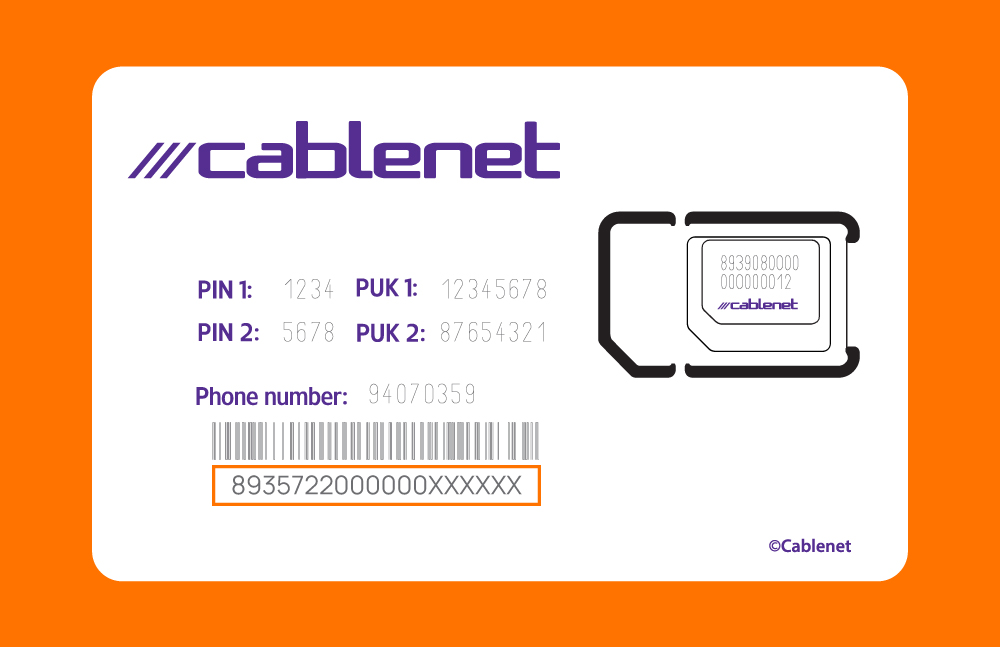
Find it on your SIM card: The ICCID appears on the back side of your SIM card, under the barcode.
Please check if your mobile number is registered and activated. If you have not completed the number identification process yet, you can do so by clicking here. If you have completed it and still cannot link your number to the Cablenet.me app, please visit a Cablenet store or call us at 130 for assistance.
In order to activate your number, you have to complete the Prepaid Number Identification procedure. The process can be done either through our website or via the Cablenet.me app. Your line will then be activated, and you will be able to use your line for calls, SMS or Data, while in Cyprus or abroad. You will also be able to link it with the Cablenet.me app, top-up. activate an Always-On pass, top-up and/or transfer credit to another Cablenet prepaid subscriber.